Content Injection Vulnerability in WordPress
As part of a vulnerability research project for our Sucuri Firewall (WAF), we have been auditing multiple open source projects looking for security issues. While working on WordPress, we discovered was a severe content injection (privilege escalation) vulnerability affecting the REST API. This vulnerability allows an unauthenticated user to modify the content of any post or page within a WordPress site.
We disclosed the vulnerability to the WordPress Security Team who handled it extremely well. They worked closely with us to coordinate the disclosure timeline and get as many hosts and security providers aware and patched before this became public.
A fix for this was silently included on version 4.7.2 along with other less severe issues. This was done intentionally to give everyone time to patch. We are now disclosing the details because we feel there has been enough time for most WordPress users to update their sites.

One of these REST endpoints allows access (via the API) to view, edit, delete and create posts. Within this particular endpoint, a subtle bug allows visitors to edit any post on the site.
The REST API is enabled by default on all sites using WordPress 4.7.0 or 4.7.1. If your website is on these versions of WordPress then it is currently vulnerable to this bug.
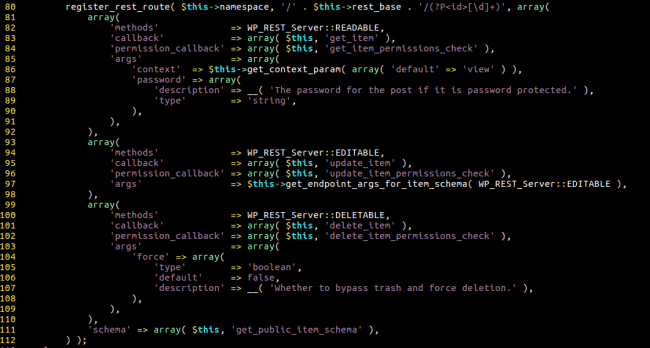
There are a couple of things to notice here. The registered route is designed to populate the ID request parameter with digits. For example, if you are sending a request to /wp-json/wp/v2/posts/1234 – the ID parameter would be set to 1234.
This behavior alone could be a good way to prevent attackers from crafting malicious ID values, but when looking at how the REST API manages access, we quickly discover that it prioritizes $_GET and $_POST values over the ones generated by the route’s regular expression. This makes it possible for an attacker to send a request like: /wp-json/wp/v2/posts/1234?id=12345helloworld – which would assign 12345helloworld to the ID parameter – which now contains more than just digits.
Investigating further, we had a look at the various callbacks (in the screenshot above) and one of them kept our attention: the update_item and its permission check method update_item_permissions_check.
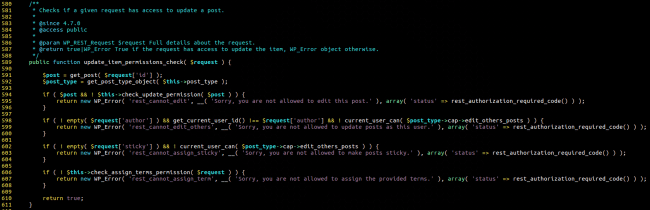
In short, it passes our alphanumeric ID value directly to the get_post() function. This function validates the request by checking if the post actually exists and whether our user has permission to edit this post. We found this to be a curious way of sanitizing the request. If we send an ID that doesn’t have a corresponding post, we can just pass through the permission check and be allowed to continue executing requests to the update_item method!
Curious about what could cause get_post() to fail at finding a post (other than a non-existent ID), we realized it used the get_instance() static method in wp_posts to grab posts.

As you can see from the code, it would basically fail on any input that isn’t all made of numeric characters – so 123ABC would fail.
For an attacker, this means that WordPress (thinking it’s a user with enough privilege to edit this post) would run the update_item method.
We thought it would make sense to check what this method does.
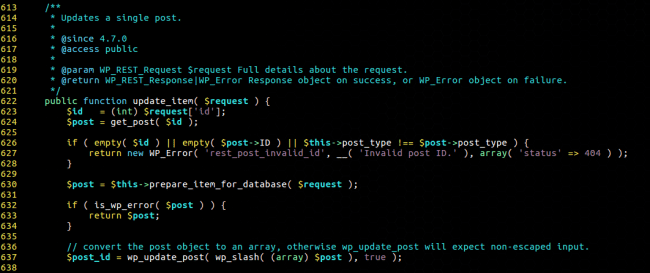
There is a very subtle, yet important detail in that last screenshot – WordPress casts the ID parameter to an integer before passing it to get_post!
This is an issue because of the way PHP does type comparisons and conversions. For example, one can see that the following snippet would return 123:

This leads to a very dangerous situation where an attacker could submit a request like /wp-json/wp/v2/posts/123?id=456ABC to change the post whose ID is 456!
Due to this type-juggling issue, it is then possible for an attacker to change the content of any post or page on a victim’s site. From there, they can add plugin-specific shortcodes to exploit vulnerabilities (that would otherwise be restricted to contributor roles), infect the site content with an SEO spam campaign, or inject ads, etc.
Depending on the plugins enabled on the site, even PHP code could be executed very easily.
This is a serious vulnerability that can be misused in different ways to compromise a vulnerable site. Update now!
https://blog.sucuri.net/2017/02/content-injection-vulnerability-wordpress-rest-api.html
As part of a vulnerability research project for our Sucuri Firewall (WAF), we have been auditing multiple open source projects looking for security issues. While working on WordPress, we discovered was a severe content injection (privilege escalation) vulnerability affecting the REST API. This vulnerability allows an unauthenticated user to modify the content of any post or page within a WordPress site.
We disclosed the vulnerability to the WordPress Security Team who handled it extremely well. They worked closely with us to coordinate the disclosure timeline and get as many hosts and security providers aware and patched before this became public.
A fix for this was silently included on version 4.7.2 along with other less severe issues. This was done intentionally to give everyone time to patch. We are now disclosing the details because we feel there has been enough time for most WordPress users to update their sites.

Are You At Risk?
This privilege escalation vulnerability affects the WordPress REST API that was recently added and enabled by default on WordPress 4.7.0.One of these REST endpoints allows access (via the API) to view, edit, delete and create posts. Within this particular endpoint, a subtle bug allows visitors to edit any post on the site.
The REST API is enabled by default on all sites using WordPress 4.7.0 or 4.7.1. If your website is on these versions of WordPress then it is currently vulnerable to this bug.
Technical Details
Our journey begins in ./wp-includes/rest-api/endpoints/class-wp-rest-posts-controller.php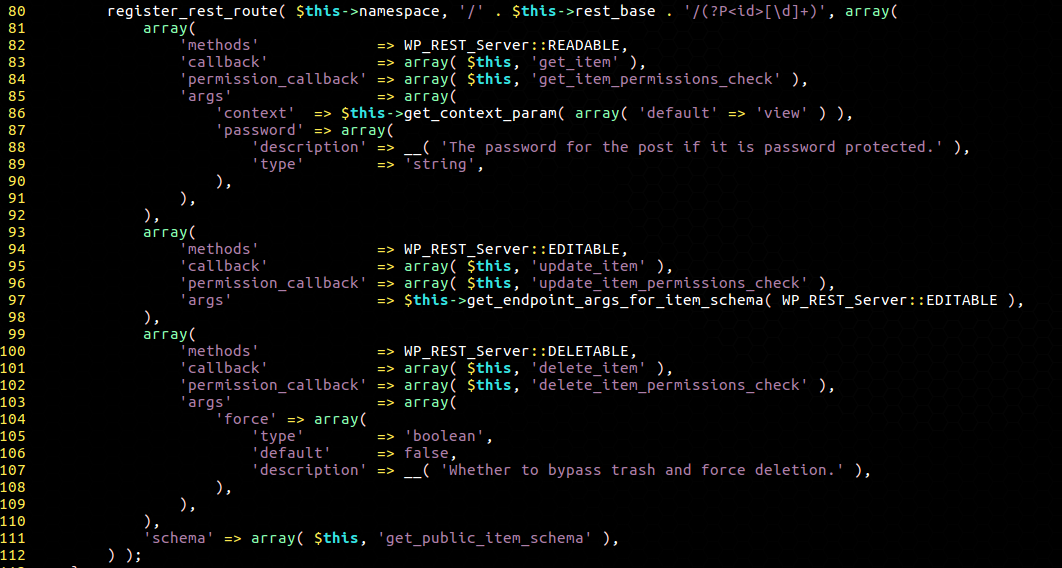
There are a couple of things to notice here. The registered route is designed to populate the ID request parameter with digits. For example, if you are sending a request to /wp-json/wp/v2/posts/1234 – the ID parameter would be set to 1234.
This behavior alone could be a good way to prevent attackers from crafting malicious ID values, but when looking at how the REST API manages access, we quickly discover that it prioritizes $_GET and $_POST values over the ones generated by the route’s regular expression. This makes it possible for an attacker to send a request like: /wp-json/wp/v2/posts/1234?id=12345helloworld – which would assign 12345helloworld to the ID parameter – which now contains more than just digits.
Investigating further, we had a look at the various callbacks (in the screenshot above) and one of them kept our attention: the update_item and its permission check method update_item_permissions_check.
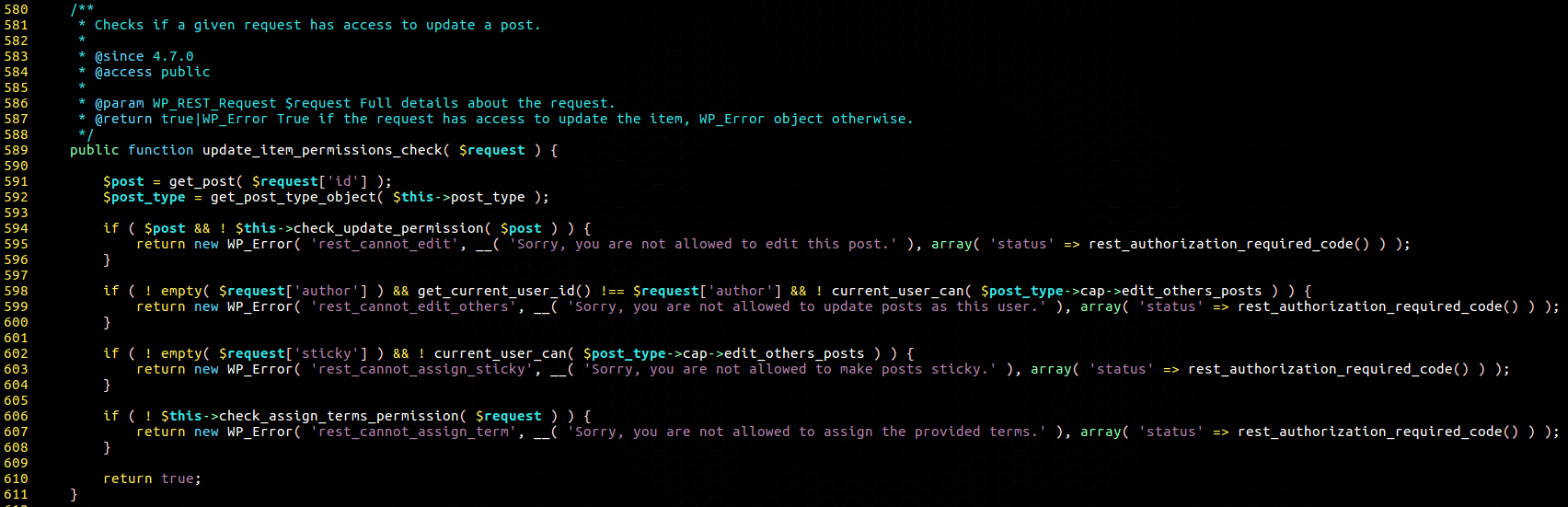
In short, it passes our alphanumeric ID value directly to the get_post() function. This function validates the request by checking if the post actually exists and whether our user has permission to edit this post. We found this to be a curious way of sanitizing the request. If we send an ID that doesn’t have a corresponding post, we can just pass through the permission check and be allowed to continue executing requests to the update_item method!
Curious about what could cause get_post() to fail at finding a post (other than a non-existent ID), we realized it used the get_instance() static method in wp_posts to grab posts.

As you can see from the code, it would basically fail on any input that isn’t all made of numeric characters – so 123ABC would fail.
For an attacker, this means that WordPress (thinking it’s a user with enough privilege to edit this post) would run the update_item method.
We thought it would make sense to check what this method does.
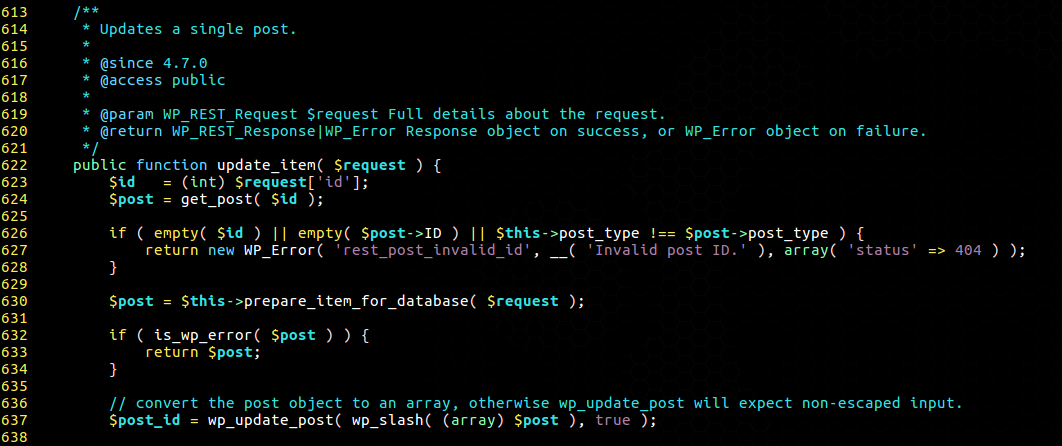
There is a very subtle, yet important detail in that last screenshot – WordPress casts the ID parameter to an integer before passing it to get_post!
This is an issue because of the way PHP does type comparisons and conversions. For example, one can see that the following snippet would return 123:
This leads to a very dangerous situation where an attacker could submit a request like /wp-json/wp/v2/posts/123?id=456ABC to change the post whose ID is 456!
Due to this type-juggling issue, it is then possible for an attacker to change the content of any post or page on a victim’s site. From there, they can add plugin-specific shortcodes to exploit vulnerabilities (that would otherwise be restricted to contributor roles), infect the site content with an SEO spam campaign, or inject ads, etc.
Depending on the plugins enabled on the site, even PHP code could be executed very easily.
In Conclusion
If you have not enabled automatic updates on your website, update as soon as possible!This is a serious vulnerability that can be misused in different ways to compromise a vulnerable site. Update now!
https://blog.sucuri.net/2017/02/content-injection-vulnerability-wordpress-rest-api.html
:v i have code python for this vuln
ReplyDelete